Este artículo está disponible solo en inglés.
Short answer: if the brokerage gave you the website, you lose it the day you leave — the pages, the URL, the leads in it and usually the email address too. If you own the domain and the site, you keep everything and the move is a small edit: swap the brokerage's licensed name, logo and email, then update your profiles. The deciding question is not how good the site is. It is whose name the domain is registered in.
If the brokerage built it, assume you are starting over
Most "free" agent websites from a brokerage are a page or a subdomain on the brokerage's own platform — something like yourbrokerage.com/agents/your-name. That page is the brokerage's asset. When your license moves, your access ends, and there is nothing you can redirect, because you never controlled the domain it lived on.
The practical losses, in rough order of how much they hurt:
- The URL. Every business card, sign rider, portal profile and social bio pointing at it now leads to a 404 or, worse, to whoever the brokerage assigns your old slug to.
- The email address. An
@brokerage.comaddress is switched off with the rest of your account. Mail to it bounces, including from past clients who only ever had that one. - Whatever ranked. If that page picked up any search traffic for your name, the ranking belongs to the brokerage's domain and stays with it. You cannot 301 a page you do not own.
- The content. Your bio, your area pages, your testimonials and any blog posts are usually inside a CMS you lose the login to.
- The leads. Inquiries submitted through a brokerage form were delivered to a brokerage system. Expect to keep only what you already exported.
None of this is the brokerage behaving badly. It is the normal consequence of a tool you were lent rather than one you own, and it is the strongest practical argument for having your own site alongside the brokerage page — which we have argued separately.
If you own the site, moving is a one-day edit
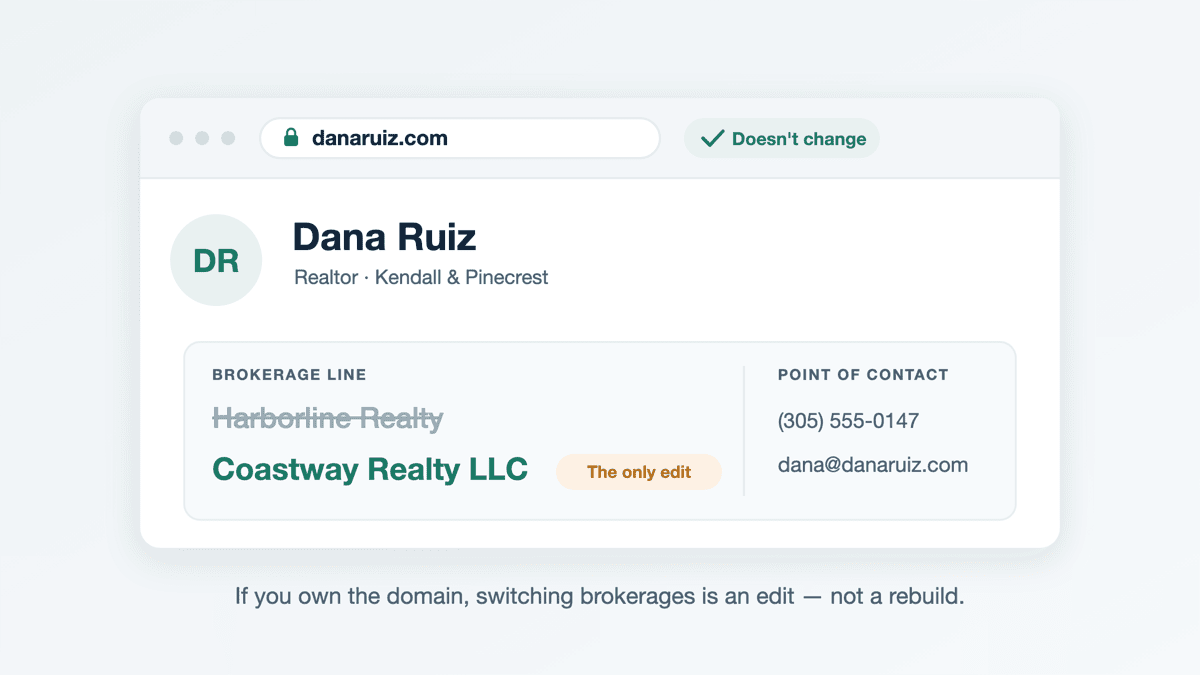
When the domain is registered in your name and the site is yours, changing brokerages touches surprisingly little. The photos, the copy, the area guides, the testimonials, the search history of the domain and the contact form all stay exactly as they are. What changes is the set of places your old brokerage is named:
- The brokerage's licensed name wherever it appears — footer, contact page, and anywhere your phone, email or address is printed.
- The old brokerage logo, which comes off straight away. It is their trademark, and your license to use it ended with your affiliation.
- Your email address, if it was a brokerage one.
- Any brokerage-specific disclosures, compliance pages or links the old shop required.
- Your license line, if it shows the brokerage's license number alongside yours.
That is an edit, not a rebuild. It is also why the registrant on the domain matters more than any feature on the site — if a marketing coordinator at the old brokerage registered it for you, sort that out before you give notice, not after. We covered the ownership question and how to check it in can I use my own domain for my real estate website.
The Florida rule that decides what has to change
In Florida this is not a branding preference, it is an advertising rule. The licensed name of the brokerage firm must appear in all real estate advertisements, and for websites the rule is specific about placement: internet ads and websites must display the brokerage company's licensed name above, below or adjacent to the point of contact information — meaning next to the phone number, email address or physical address a visitor would use to reach you (Rule 61J2-10.025(3)(a), Florida Administrative Code, as summarized by Florida Realtors).
Two details catch people out:
- It must be the licensed name — the full name the firm is registered under with the Department of Business and Professional Regulation, not the trade name on the sign or the shortened version everyone says out loud. Look it up on the DBPR license search and copy it exactly.
- It has to sit next to the contact details, not just somewhere on the site. A brokerage name in the footer while your phone number sits in a sticky header is the common version of getting this wrong.
Outside Florida the requirement exists in some form nearly everywhere, but the wording and the placement rules differ — Texas and California both work differently, and we go through those in what's required on a real estate website.
The moving-day checklist
Have all of this prepared in advance, then publish it when the transfer is actually effective — your site has to name the brokerage you are registered with, so it should not announce the new one early or keep claiming the old one late.
- Brokerage name next to every point of contact, spelled as DBPR has it.
- Old logo removed everywhere, including the favicon and any image you forgot was a logo.
- New email address on the site, the forms and your signature.
- Google Business Profile updated. A name change there goes through Google's review rather than taking effect instantly, so do it early in the day and check it the next. Our Google Business Profile guide covers the rest of that record.
- Portal and association profiles — Zillow, Realtor.com, Homes.com, your local board — all of which list a brokerage.
- Social bios and link-in-bio pages, which are where the old brokerage name survives longest.
- Your IDX or MLS feed, if you have one. Feed access is authorized through a broker's MLS participation, so it does not travel with you; it has to be re-approved under the new brokerage. One more reason we think most agents should not bother with IDX at all.
- Printed and paid material — sign riders, cards, and any live ads whose landing page you just changed.
What to export before you give notice
Do this while you still have logins, not after. In order of how hard it is to recreate:
- Your contact database, as a CSV. Check your brokerage's policy on what is yours to take — that varies by contract, and it is a conversation to have before you resign, not a thing to discover afterwards.
- Testimonials and reviews, with the client's name and the date, so you can re-publish them on a site you own.
- Your own writing — bio, area guides, blog posts. Copy the text out; you wrote it, and recreating it from memory is slow.
- Closed-listing photos, with permission in writing. Listing photography is usually licensed to the listing brokerage by the photographer, not to the agent personally. Ask rather than assume, and get the answer in an email.
- Screenshots of anything you want rebuilt. Cheaper than describing it later.
Common questions
Does my brokerage own my website?
If the brokerage registered the domain or the site lives on the brokerage's platform, effectively yes — you have access, not ownership, and access ends when the affiliation does. If the domain is registered in your name and the site is yours, the brokerage owns none of it; what they can require is that it displays their licensed name correctly while you are with them. The way to know for certain is to look up who the registrant and admin contact on the domain actually are.
Do I have to put my new brokerage's name on every page?
In Florida, what matters is that the brokerage's licensed name appears above, below or adjacent to the point of contact information. In practice, if your phone number or email appears in a footer on every page, the brokerage name belongs there too. The simplest compliant setup is one site-wide footer carrying your name, your license, the brokerage's licensed name and the contact details together.
Can I keep my old brokerage email address for a while?
No — expect it to stop the day your account is closed, with no forwarding. This is the single most expensive thing about a brokerage-provided setup, because every past client, title company and lender has that address. An address on a domain you own moves with you and keeps working, which is the reason we compared the email options separately.
Will my search ranking drop when I change brokerages?
If the site is yours, the domain does not change, so the thing search engines have been building trust in does not change either. You are editing a business name and some contact details, not moving to a new address. If your presence was a page on the brokerage's domain, there is nothing to carry over — that ranking was never yours.
Can I keep using my old brokerage's logo until I finish updating everything?
No. Treat the logo as something to remove on day one, not something to phase out. It is their trademark, your permission to use it came from the affiliation, and a site showing the wrong brokerage is also the kind of thing the advertising rules exist to prevent. A plain text brokerage name is compliant; a stale logo is not.
Should I change my domain name when I change brokerages?
Almost never. A domain built on your own name — janedoerealestate.com — needs nothing done to it when you move, which is exactly why it is the right choice at the start. The agents who have to change are the ones whose domain contains a brokerage name, and that is the one naming decision worth being careful about.
How long should the website part of a brokerage move take?
If you own the site, it is an hour of edits and a day of waiting on Google and the portals to catch up. If the brokerage owned it, you are building a new site and reclaiming a URL you never had, which is a different size of job — and the reason to own one before you need it.
If you are moving and need your own site rather than the next brokerage's: Swift Agent Sites builds one for $89 a month, or $890 a year, with no setup fee - usually live the same day, on your own domain, with hosting, https, English and/or Spanish, and a contact form that sends leads straight to you.
Sources
- Florida Realtors — Realtor advertising rules in Florida (Rule 61J2-10.025, Florida Administrative Code, including the website placement requirement)
- Florida DBPR license search (to confirm a brokerage's exact licensed name)