Este artículo está disponible solo en inglés.
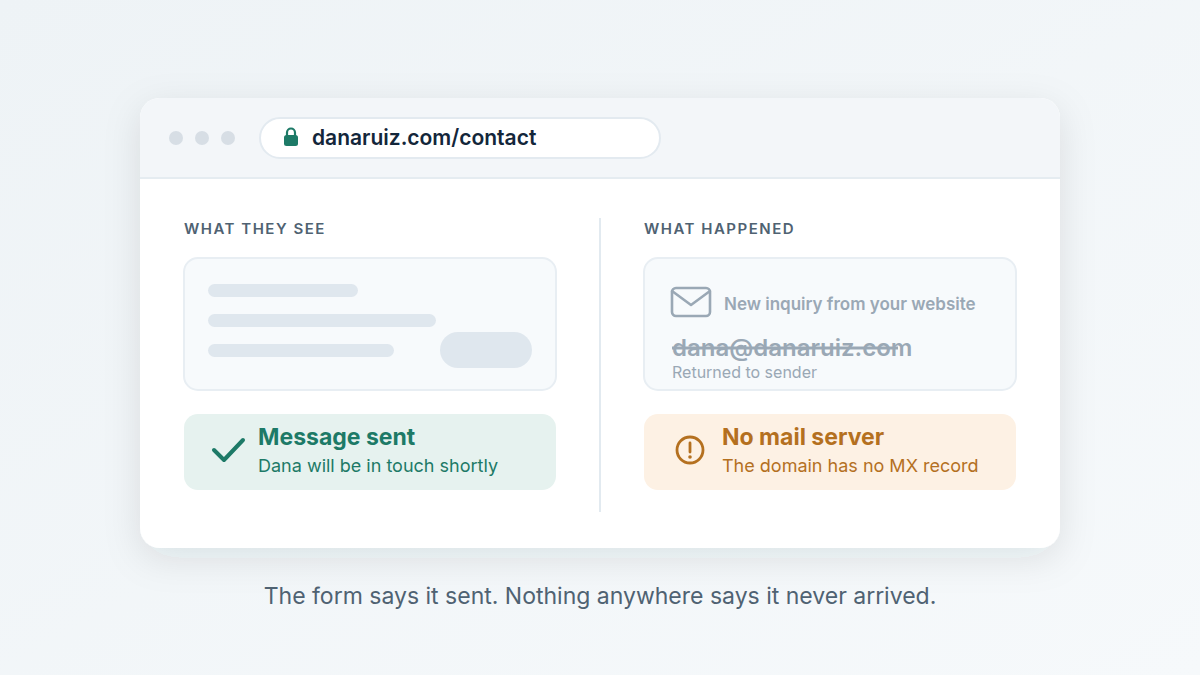
If your contact form looks like it works but nothing reaches your inbox, the usual cause is email rather than the form. Three things break quietly: your domain has no mail server, the form sends to an address that no longer exists, or the message arrives and goes straight to spam. All three are checkable in a few minutes, and none of them tell you they are happening.
Why you would never notice
A broken contact form is the only marketing problem that hides itself from both sides. The person who wrote to you believes they have been in touch and is waiting for an answer. You see a quiet week. Neither of you has any reason to suspect anything, and the inquiry is simply gone.
Compare that to a site being down, which somebody tells you about within a day, or a listing photo looking wrong, which you can see yourself. Nobody is going to ring you to say your form did not work. They will ring the next agent.
How long could this have been going on?
Longer than people expect, because the trigger is usually a change nobody connected to the form: moving the domain to a new host, switching brokerages and losing the old address, changing email provider, or a web person setting the form up to notify an address that was already out of date. The form keeps showing its thank-you message either way. That message proves the page worked, not that anything was delivered.
The three ways it breaks
In the order worth checking, because the first is binary and takes a minute.
Is there a mail server on your domain at all?
A domain only accepts email if it has an MX record — a line in its DNS saying which mail server to deliver to. Plenty of small business domains have none, usually because the site was set up by someone who used a Gmail address and never configured mail on the domain itself.
If there is no MX record, then anything sent to an address at that domain bounces immediately. Not spam, not delayed — refused. That includes the address printed on your own site, and it includes the notification your contact form tries to send you if it sends to a domain address.
This is the one worth checking first, because it is binary. Either the record is there or it is not.
Where does the form actually send?
Most contact forms work by emailing a notification somewhere. That destination is set once, usually by whoever built the site, and then never looked at again. It is commonly an old brokerage address, a personal address from two jobs ago, or an assistant who has left.
The form reports success because it handed the message to its mail service successfully. What happened after that is not something the page can see.
Is it arriving and going straight to spam?
If your form sends its notification as if it came from the visitor — using their address in the From line — your own mail provider is being asked to accept a message claiming to be from a stranger's domain, sent by a server that domain has never authorized. That is close to the definition of a forged email, and modern filters treat it accordingly.
Two DNS records decide how suspicious that looks: SPF, which lists who may send on your domain's behalf, and DMARC, which tells receiving servers what to do when something does not line up. They matter less than the first two problems on this list, and they are worth getting right once the obvious things are ruled out.
How to check yours in five minutes
- Send one from outside. From a phone that is not on your own email account, send a message to the address printed on your site. If it bounces, you have found it. If nothing arrives and nothing bounces, look in spam before assuming it worked.
- Fill in your own contact form. Use a real address you can read. Then wait a full hour — some notifications are queued — and check spam as well as the inbox.
- Find out where the form actually sends. Whoever set the site up will know, and if nobody does, that is itself the answer. It should go somewhere you read every day.
- Check the DNS. We run a free check at swiftagentsites.com/check that reads the public records for your domain and tells you whether there is a mail server, what SPF and DMARC say, and when the domain expires. There is no sign-up, and we don't keep a list of the sites people check.
What if it has been broken for months?
You cannot recover the inquiries — a bounced message is gone, and a filtered one is in a spam folder nobody kept. What you can do is fix the cause and then test it the same way a stranger would, from outside your own account. It is also worth telling anyone who might have tried to reach you, if you have another way to contact them.
Keep it from happening again
The reason this goes unnoticed for so long is that nothing is watching. Mail configuration breaks during changes you had good reasons to make, and the breakage is silent by nature.
Two habits cover most of it. Test your own contact form from outside your account once a quarter — it takes two minutes and it is the only test that proves the whole path. And make sure the notification goes to an address you will still read in two years, which usually means your own domain rather than a brokerage's.
Our free check also offers to watch the domain for you: if the mail records stop working, or the domain is heading for expiry, you get an email about it. That is the whole of it — no account, and nothing else is sent.
Swift Agent Sites builds agents a site on their own domain, usually live the same day, from $89 a month or $890 a year with no setup fee. Hosting and https are included, it can be in English or Spanish, and the contact form sends leads straight to the agent.
Related: