Este artículo está disponible solo en inglés.
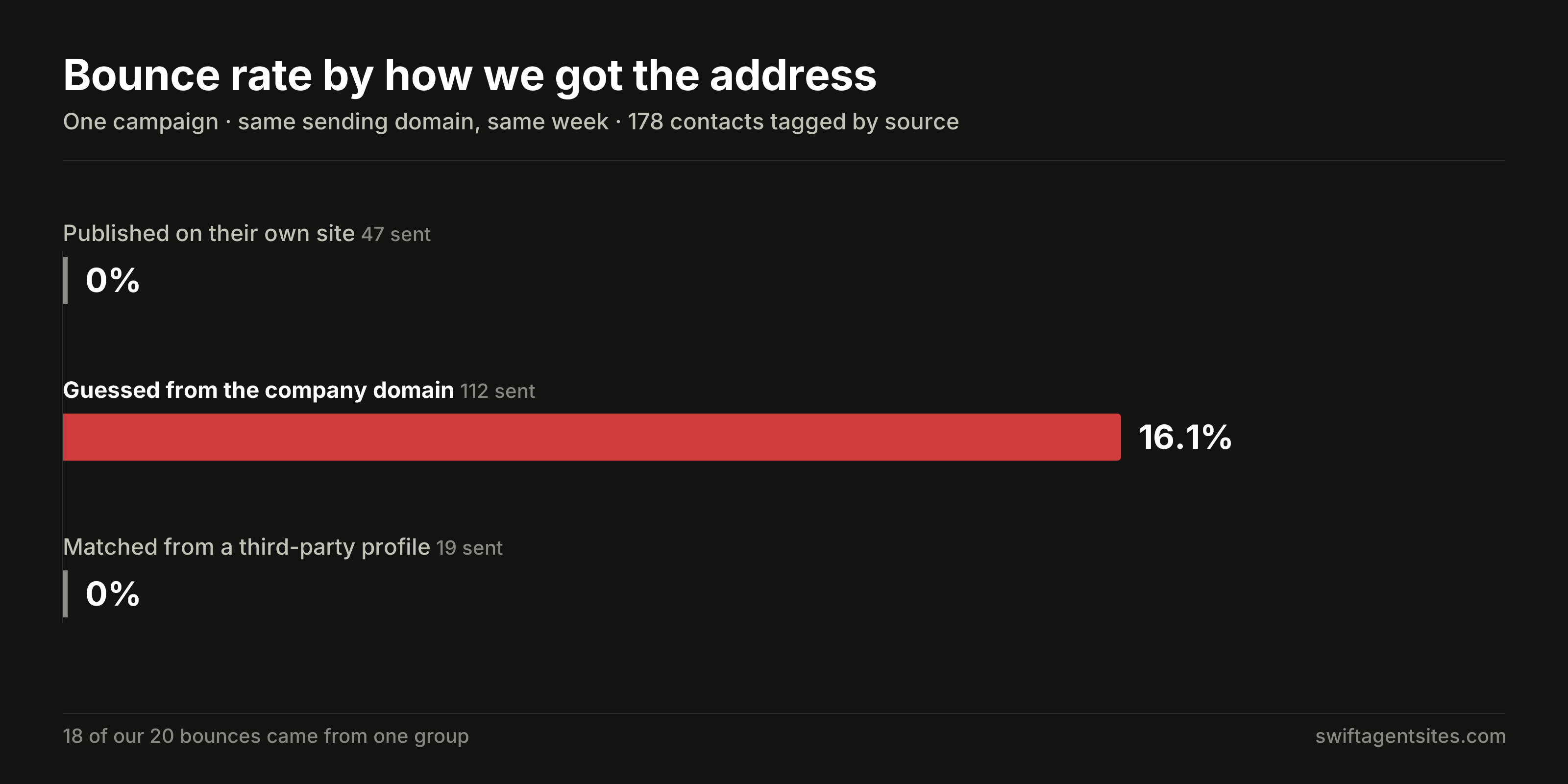
If you build an email address by guessing the pattern — firstname@theirbrokerage.com — expect roughly one in six to bounce. We ran one campaign across 338 contacts whose addresses we had collected three different ways, and the split was not subtle. Addresses published on the contact's own website bounced 0% of the time (0 of 47). Addresses matched from a third-party profile bounced 0% (0 of 19). Addresses guessed from the company domain bounced 16.1% (18 of 112). Eighteen of our twenty total bounces came from that one group.
Account-wide that worked out to 20 bounces in 338 sends — 5.9%, which sits above the 5% mark Twilio SendGrid's own documentation names as the point to stop and audit how you are collecting addresses. These are our real numbers from our own outreach, not a case study. Here is what they cost us and the checklist we use now.
Why does this matter if you are an agent?
Because agents build lists constantly and rarely think of it as list-building. A farm area exported from the county record. A stack of expired listings. A bought lead list. Contacts scraped out of an old CRM when you changed brokerages. Every one of those arrives with addresses of unknown origin, and every outreach tool on the market will cheerfully fill the gaps by guessing.
The addresses it invents sit in your CRM next to the ones you verified properly, and there is no way to tell them apart by looking. You find out which is which when you press send.
What did the test actually measure?
We had 654 contacts in the account. 338 of them received this campaign, and 178 of those were tagged by how we had obtained the address in the first place. Same campaign, same sending domain, same week — the only variable was where the address came from.
- Published on their own site — visible in a mailto: link or in the text of a contact page. 47 sent, 0 bounced, 0%.
- Guessed from the company domain — built from a pattern: first name, then the domain. 112 sent, 18 bounced, 16.1%.
- Matched from a third-party profile — found on an outside profile we could tie to the same person by name and phone. 19 sent, 0 bounced, 0%.
One method produced every bounce worth talking about.
Why do guessed addresses fail even when the domain works?
A guessed address fails in two ways, and only one of them is obvious.
The obvious one: the pattern is wrong. Plenty of brokerages use f.lastname@, or firstinitiallastname@, or route everything through info@. Your guess bounces and you have learned nothing except that you have spent a little of your sending reputation.
The less obvious one, and the expensive one: the pattern is right and the mailbox does not exist. The agent left two years ago. The brokerage moved to a new domain and kept the old one alive for the website only. The domain has perfect MX records and answers on port 25, so every "email verification" service tells you it is valid — and then the receiving server rejects that individual recipient.
That is what happened to us. Of our 20 bounces, 18 were on domains with working mail servers. A syntax check passed. An MX check passed. The mailbox simply was not there.
This is the trap in most verification tooling: it verifies the domain and reports it as verifying the address. Those are different claims, and the gap between them is where your bounce rate lives.
What bounce rate actually puts your sending at risk?
Our 5.9% was not a campaign that underperformed. It was a campaign that threatened every other email going out of that account, including replies to agents who were already in conversation with us.
- Twilio SendGrid's deliverability documentation tells senders to audit their address collection practices if overall bounce rate is consistently over 5%. We were over it on a single send.
- Mailchimp suspends accounts whose bounce rate exceeds what it calls industry thresholds. It does not publish the number, which is worth knowing — you do not get to calculate how close you are.
- Gmail's bulk sender rules are built around spam complaint rate rather than bounces: keep it below 0.1%, and never let it reach 0.3%. Bounces are not counted directly, but repeatedly hitting dead mailboxes is one of the clearest signals that a sender does not know who is on their list, and it feeds the domain reputation that governs whether you land in the inbox at all.
One unverified list can take the rest of your sending down with it. If you are sending from an address on your own domain — which you should be, for the reasons we set out in our 2026 agent email price comparison — then the reputation you are risking is attached to your name for as long as you keep that domain.
How do you build a list that does not bounce?
The rule we settled on is simple and absolute: if we cannot see the address published somewhere, it does not go on the list.
We tested that against a fresh set of 550 businesses, every one of which had a website. What survived:
- 550 businesses in the list.
- 405 sites published an address we could actually read.
- 314 survived the filters below.
- 311 survived a final MX check.
The 94 we threw out are the interesting part, because a looser tool would have handed all of them over as verified:
- 57 — the address was on an unrelated domain. A page for one business carrying another business's contact address. Shared offices, a page copied from a template, an old tenant who was never cleaned out.
- 25 — vendor boilerplate. One web designer's address appeared on four different client sites; another on seven. It is a real, working address. It is not the business's.
- 9 — template placeholders. user@domain.com, left in the theme and never replaced. Live on the site, looks like an address, reaches nobody.
- 3 — the domain had no MX record at all.
The single most useful filter was also the simplest: does this address's domain have anything to do with this business's website? If not, drop it, however published it looks.
What should you check before importing a list?
- Read it off their own site. A mailto: link or visible text on a page they control. Note the URL you found it on and keep that note on the record — if it ever bounces, you can see exactly what the claim rested on.
- Decode obfuscated addresses properly. Many sites hide addresses behind Cloudflare's email protection. The decoded value is the real published address, so if your tool skips those, you are discarding good contacts.
- Check the address's domain matches the site's. Free providers are fine — agents really do publish Gmail addresses. An unrelated business domain is not.
- Count how many different sites an address appears on. Two is a coincidence. Four is the web developer.
- Reject placeholders explicitly. user@, youremail@, @domain.com, @example.com.
- Run the MX check last, not first. It removes dead domains. It will tell you nothing about whether the mailbox exists.
- Keep the ones you could not verify — just not on the email list. They still have a phone number, and a call is not governed by your sending reputation.
Is the shorter list actually worth it?
Our list went from 550 names to 311 addresses. That looks like a 43% loss until you price the alternative. At the 16.1% rate we measured, the other 239 would have produced roughly 38 additional bounces — and 38 bounces on top of what we already had would have pushed the account well past the point where providers stop delivering.
The shorter list is not a compromise. It is the only version that keeps sending at all.
It is also worth being honest about where email sits for an agent. It is a follow-up channel, not a prospecting miracle — the relative economics of email against portals, paid ads and referrals are laid out in our comparison of every lead generation channel, and for anyone starting from zero, how new agents get their first leads online is the better starting point. The cheapest list of all is the one that opts in through a form on your own site, which is why a working lead form is on our list of what every agent website should include.
Frequently asked questions
What is an acceptable email bounce rate?
Below 2% is comfortable. Twilio SendGrid's documentation treats a rate consistently over 5% as a signal to audit how you collect addresses. Our 5.9% on a single send was firmly in the territory where platforms intervene.
Do email verification services catch guessed addresses?
Often not. Most check syntax and whether the domain accepts mail, which a dead mailbox on a live domain passes easily. In our test, 18 of 20 bounces were on domains with working mail servers, so every domain-level check said they were fine.
Is it legal to email agents whose addresses I found on their website?
In the US, CAN-SPAM permits unsolicited commercial email provided you identify yourself, give a real postal address and honour opt-outs promptly. Other jurisdictions are stricter — Canada's CASL and the EU's GDPR generally require consent. Publication on a website is not consent, so check the rules where your recipients are.
What should I do with contacts I could not verify?
Keep them, and call them. A phone number costs you nothing in sending reputation, and an unverified email address on your list puts every other message you send at risk.
Should I delete addresses that have already bounced?
Yes, immediately, and never retry a hard bounce. Repeatedly sending to a confirmed dead mailbox is one of the fastest ways to damage the reputation of a domain you intend to use for years.
Keep your contacts somewhere that does not punish you for this
Swift Agent Sites builds sites and CRMs for independent real estate, insurance, consulting and talent agents — so the contacts coming off your own lead form arrive verified by the only method that ever worked in our test: the person typed the address themselves. See plans and start your free month →
An email address on your own domain is part of the same argument for owning your web presence rather than renting it, which we made in Do I need my own website if my brokerage gives me one?
Sources
- Twilio SendGrid — Deliverability Insights (bounce, block and spam report thresholds)
- Mailchimp — About Bounce Suspension
- Mailchimp — About Bounce Warnings
- Google — Email sender guidelines FAQ (spam rate thresholds)
- Google — Email sender guidelines
- US Federal Trade Commission — CAN-SPAM Act: A Compliance Guide for Business
- Swift Agent Sites — Pricing