Este artículo está disponible solo en inglés.
Short answer: Google suspends a profile that breaks its listing rules, and for agents the rules to check are the name, the address and duplicates. Google's appeals tool shows the reason. Fix the profile first, then appeal once with documents whose name and address match it, and expect a decision within about five business days.
Everything below comes from Google's own help pages as they read on 15 October 2026: the Business Profile guidelines, the page on suspended profiles and restricted accounts and the appeals guide. Google does not publish how often each cause occurs, so the list below follows its rules, not a ranking.
What does "suspended" actually mean?
Google says it may suspend or disable Business Profiles that do not follow its guidelines. While a profile is suspended, the public cannot see it and you cannot manage it. Google describes a few kinds of restriction, and they are appealed differently:
- A suspended or disabled profile. One listing is down. You appeal it in the Business Profile appeals tool.
- A restricted account. Every profile on your Google account is suspended, and you cannot create or claim new ones. You appeal the account first, on the My accounts page, and only then the profile.
- Review restrictions. If Google finds fake or paid-for reviews, its restrictions page says it may stop new reviews for a period, hide existing ones for a period, or show customers a warning that fake reviews were removed. The profile stays up, but the reviews are what you lose.
Which rules do agents' profiles usually break?
Google names real estate agents as individual practitioners, alongside doctors, lawyers and insurance agents. That gives you the right to your own profile, and it also brings rules that catch agents specifically.
Is my profile name the problem?
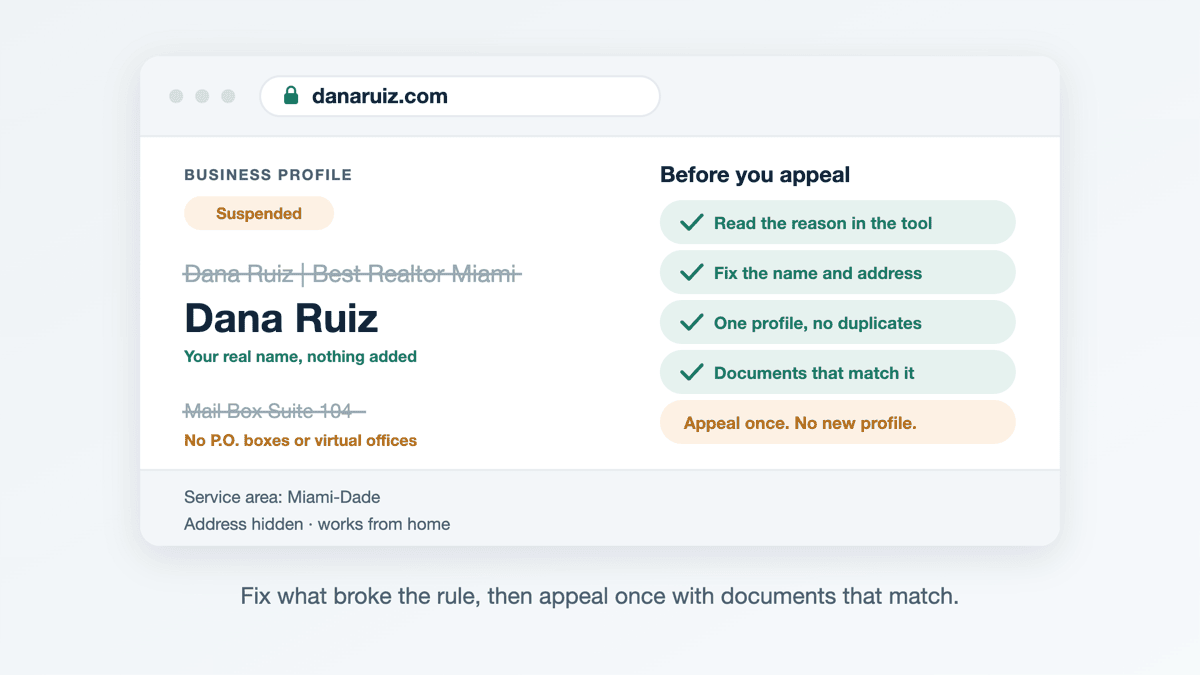
Often it is. Google's guidelines say the name should be your real-world name, used consistently on signage, your website and stationery. They list taglines, phone numbers, locations and similar extras as things that do not belong in the name, and warn that adding them could result in suspension. "Dana Ruiz | Best Realtor Miami" breaks that rule. "Dana Ruiz" does not.
The brokerage's name follows its own rule. If you are the only public-facing agent at the address, Google asks for one shared profile named [brand]: [your name], using its own example, "Allstate: Joe Miller". If several agents work from that office, the office gets its own profile and yours carries only your name. Putting the brokerage's name on your profile in that case makes it look like a second copy of the office's listing.
Is my address allowed?
This is the other common trap. Google's rules on addresses:
- No P.O. boxes or remote mailboxes.
- No virtual offices. A rented mailing address where you do not actually work is not eligible.
- Co-working space only with signage and staff. The office needs clear signage and has to be staffed and receive customers during business hours.
- Working from home means hiding the address. If clients do not visit you, Google says to hide the address and set a service area instead, generally within about two hours' drive of your base.
Using the brokerage's address is fine if you can actually be reached there during the hours you list. Google's practitioner rule says you must be contactable directly at the verified location during your stated hours.
Do I have a duplicate profile?
Google allows one profile per business, and one per practitioner. Duplicates often happen by accident: an agent loses access to an old profile and makes a new one, or a brokerage made one for you years ago. Google also says a practitioner should not have several profiles to cover different specialties, so a separate "Dana Ruiz Luxury Homes" and "Dana Ruiz Rentals" is a duplicate too. Your assistant or a transaction coordinator should not have a profile of their own either. Google says support staff do not qualify.
Could my phone number cause it?
It can. Google says the phone number must be under the direct control of the business. A number owned by a lead-generation service or a call-routing company that you do not control does not meet that rule. Your own mobile or office line does.
How do I appeal a suspended profile?
Google's appeals guide sets out the steps. In short:
- Read the reason. Sign in to the appeals tool with the Google account that owns the profile and select it. The tool shows the decision, its date, the reason and a link to the policy Google says you broke.
- Fix the profile first. Google asks that the profile follow every guideline before you appeal. Change the name, hide the address or remove the duplicate as needed.
- Gather evidence. Google lists business registration, a business license, tax certificates and utility bills as examples. The name and address on each document must match the profile. For an agent, a document showing your name at the address you list is the kind of thing that matches.
- Submit once. Attach everything, tick the confirmation box and submit. Google states that appeals can only be submitted once and asks you not to send multiple appeals for the same issue before you get a decision.
- Wait for the email. Google says reviews and decisions can take up to five business days, and the status appears in the same tool.
Should I just make a new profile instead?
No. Google's help page says plainly not to create a new Business Profile for the same business. A new one is another duplicate, which is one of the reasons profiles get suspended, and it starts with none of your reviews.
What if my appeal is denied?
Google says you may be able to request an additional review if you have new evidence. Use the time to check every rule above again, because a second appeal with the same evidence for the same problem is unlikely to get a different answer. If the email reply does not resolve it, Google's appeals guide says to reply to that email so its support team can help.
What should I do while the profile is down?
A suspension is the clearest example of what it means to rely on someone else's platform. While Google reviews your appeal, your profile, its reviews and its link to your site are invisible, and nothing you do on Google changes that faster.
One thing still works. Your own website on your own domain keeps answering anyone who searches your name, and it is where you point your email signature, social profiles and business cards in the meantime. Keep the name, address and phone number on it identical to the profile, so your appeal evidence and your site tell Google the same story.
Swift Agent Sites builds agent sites on your own domain, with hosting and https included, in English and/or Spanish, usually live the same day, for $89 a month or $890 a year with no setup fee.
Related: