Este artículo está disponible solo en inglés.
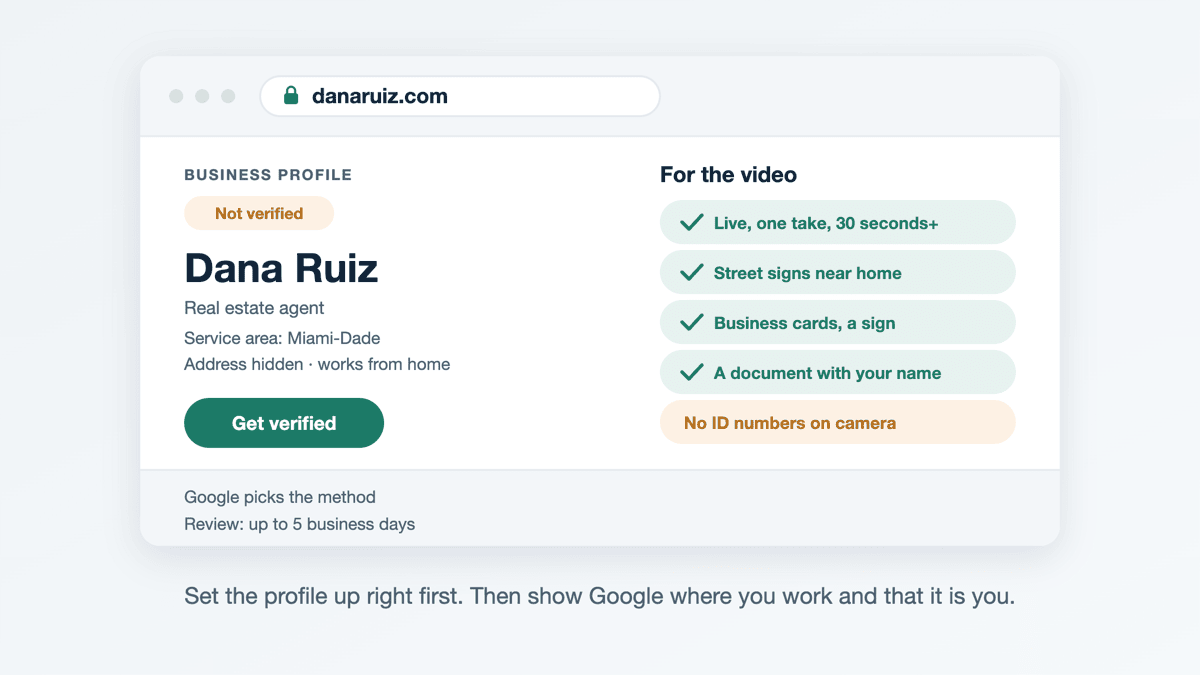
Short answer: Google picks the verification method for you: phone or text, email, a live video call, a recorded video or a postcard. If you are offered a video, film your neighborhood, your business cards and a document with your name. Set the profile up correctly first, then expect a review of up to five business days.
Everything below comes from Google's own help pages as they read on 19 October 2026: Verify your business on Google, Verify your business with a video recording and the Business Profile guidelines. Google changes these pages, so check them if a screen does not match what is written here.
Why do I have to verify at all?
Until a profile is verified you cannot edit it or reply to anyone through it. Google says verification is what gives you ownership of the profile. You need a Google account to do it, and it can be a Gmail address or your own email address.
Before you start, make sure you are allowed a profile and that it is set up the way Google expects. Google names real estate agents as individual practitioners, so in most offices you can have your own profile, separate from your brokerage's. Our earlier article, Can a real estate agent have their own Google Business Profile?, covers those rules. Two of them matter most here:
- The name is your real name. "Dana Ruiz", not "Dana Ruiz | Best Realtor Miami".
- If clients do not visit you, hide the address. Google's video page says that if you do not serve customers at your business location, do not add the address. Set a service area instead.
Which verification methods are there?
Google says the methods are chosen automatically and cannot be changed. What you are offered depends on your business type, public information, region and business hours, and sometimes you need more than one. These are the methods its help page lists:
- Phone or text. Google calls or texts a code to the business phone number. Google says automated answering systems will not get the code, so the number has to reach you, not a menu.
- Email. You follow the steps in an email sent to an address shown on the verification screen. You must be able to open that inbox.
- Live video call. A Google support person joins a video call and you show your location and that you run the business. It is only available during your listed business hours, and not for every business.
- Recorded video. You record a short video in the Business Profile app on your phone and upload it. Google recommends this method when it is offered.
- Postcard. A code is mailed to your address. Google says most codes arrive within 14 days and expire after 30 days. Not every business is offered this.
How do I pass video verification as an agent?
If the recorded video is offered, Google's rules for it are specific. The video must be:
- Recorded live through your Business Profile on a phone. You cannot upload something you filmed earlier.
- One unedited take, with no breaks, of at least 30 seconds.
- Free of sensitive details: no bank, tax or ID numbers, no private information, and no other people's faces.
Google then asks for three things. Which version applies depends on whether clients come to you.
What do I film if I work from home?
Then you are what Google calls a service-area business, and its page has a tip for exactly this case: record landmarks and street signs in your immediate neighborhood to confirm the address. For the other two parts:
- Proof the business exists. Google lists your workspace, business cards and branded clothing. For an agent that could be your business cards, a sign rider or a for-sale sign with your name on it.
- Proof you run it. Google lists business documents such as a business permit, an invoice or a utility bill that matches the name on your profile. Google does not name a real estate license, but a document carrying your name is the kind of evidence it describes. Keep sensitive numbers out of the shot.
What do I film if clients visit my office?
Then Google treats you as a storefront, and the bar is higher. The video must show street signs, building numbers or nearby businesses, and signage with the business name on a permanent fixture, such as a sign, wall or window. Google says the name in the video must match the name on the profile. That is the trap for agents at a brokerage office: the sign on the building usually says the brokerage, not you. Google also says that a business without permanent on-site signage should be listed as a service-area business instead.
Proof of management means filming something only someone who works there can reach. Google's examples are a storage room or a till; in an office, that means a staff-only room or unlocking the door.
What happens if my video is rejected?
Google tells you why. A Review issues button appears on your profile, with reasons such as "business name not visible on storefront" or "no nearby area shown". Record a new video that includes everything from the first one plus what was missing, and upload it again.
What should I avoid while I wait?
Google lists a few things that make verification slower:
- Do not edit the name, address or category while a postcard is on its way. Google says the code will stop working if you do.
- Do not request a second postcard. That cancels the first code and starts the wait again.
- Do not share the code, even with someone who manages the profile for you. Google says it will never ask you for it.
- Do not make a second profile. Google allows one per practitioner. Google says a profile it treats as a duplicate does not show on Search or Maps.
After you finish, Google says the review takes up to five business days, and sometimes longer. You get a confirmation email when it is done.
Can verification ever be instant?
Sometimes. Google says one case where it can verify a profile instantly is when you have already verified your website in Google Search Console. That is one more reason to have a site on a domain you own and control: you can verify it there, and the profile, the site and your business cards all show the same name.
What if the "Get verified" button comes back?
Google says that means it could not fully verify the business. Try again, using a different method if more than one is offered. If you changed your details recently, Google may ask for more information before it will re-verify. If you are stuck after trying the options, Google's help page says to contact support.
What if someone else already owns my profile?
This happens to agents more than it should, often because a brokerage or a former marketing company set up the profile years ago. Google's ownership page describes requesting access from the current owner. They have three days to respond. If they say no, you can appeal. If they do not answer, you may be offered the option to claim and verify it yourself, though Google says that option is not always available.
Swift Agent Sites builds agent sites on your own domain, with hosting and https included, in English and/or Spanish, usually live the same day, for $89 a month or $890 a year with no setup fee.
Related: