Este artículo está disponible solo en inglés.
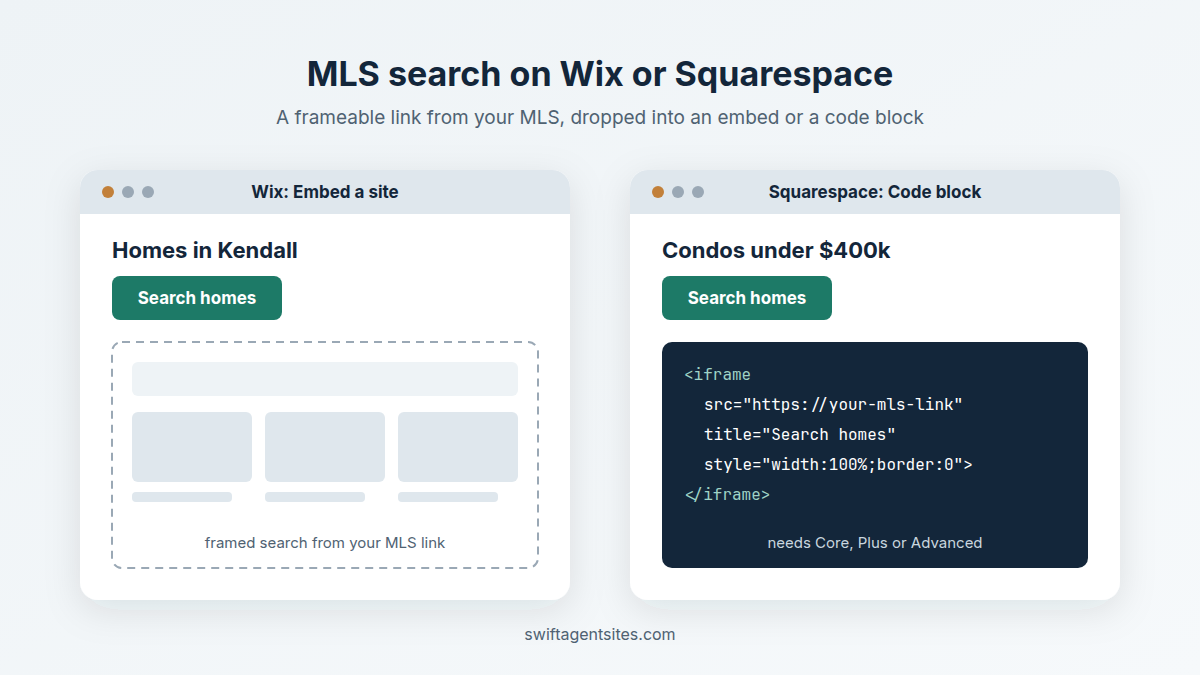
Short answer: get a frameable search link from your MLS system first. On Wix, add an Embed a site element and paste that link in. On Squarespace, add a Code block and paste an iframe that points at the link, which only works on the Core, Plus or Advanced plan (or some older plans). On any plan on either builder, a plain "Search homes" button that opens the link works too, and it's the version we'd start with.
This piece is only about the two builders. If you're still deciding between a link, a framed search and a full IDX feed, read How do I link MLS listings to my website? first. It covers the MLS side and the display rules in more detail.
The steps below come from the Wix and Squarespace help centers and one Florida MLS page, as they read on October 28, 2026. Menus move around, so if a button name doesn't match, search the builder's help center for "embed".
Step one: get a link you're allowed to frame
You need a search page that lives somewhere else and is allowed to show up inside another site. Your MLS system is the usual source. BeachesMLS in Florida, for example, says on its IDX page that members can "skip the online request form & generate a free IDX frameable link through Flexmls or Matrix."
- Build the search in your MLS system and look for a share, link or frame option. The wording depends on the system.
- Make it specific if you can. A saved search such as "Condos under $400k in Kendall" on an area page is more useful than one generic search box.
- Check the link starts with https. Wix says only HTTPS addresses display, and an HTTP one may work in preview and then break on the live site.
- Check with your broker if you're unsure what you're allowed to show. Under rules like Stellar MLS Rule 19.06, IDX display sits under the broker's license, not the agent's.
One wording trap: don't label the button "Search the MLS." Stellar's Rule 19.32 says you can't tell visitors they're searching or accessing the MLS itself. "Search homes for sale" is fine.
How do I add MLS search to my Wix site?
Wix calls it an embed. From the Wix Editor help page:
- In the editor, click Add Elements, then Embed Code, then Popular Embeds.
- Pick Embed a site if you have a plain link, or Embed HTML if your MLS or vendor gave you a code snippet.
- Click the element on the page, then Enter Website Address (or Enter Code), paste it in and click Apply.
- Drag the element's handles until the search fits, then publish and check the live page.
The newer Wix Harmony editor puts the same thing under + Add, Elements, then Embed, per its own help page.
Two things Wix warns about that catch agents out:
- Some sites refuse to be framed. Wix says some sites have security settings that stop them appearing inside another site, and there's no way around that from Wix. If you get a blank box, the MLS page is probably one of them. Use a button instead.
- Phones may show it differently. Wix's mobile help page says embeds sized for desktop may not fit on mobile, and suggests hiding the desktop version and adding a mobile one from the mobile editor. Most home searches happen on a phone, so check yours on one.
How do I add MLS search to my Squarespace site?
Squarespace does it with a Code block. From the Squarespace help page on code blocks:
- Edit the page, hover over a section and click Add block or +, then Code.
- Click the pencil icon, keep the Mode menu on HTML and paste an iframe that points at your MLS link (or the snippet your vendor gave you).
- Leave Display Source off. With it on, the block shows your code as text instead of running it.
- Save, then check the page in a logged-out or private window.
The catch is the plan. Squarespace says an iframe or JavaScript in a code block needs the Core, Plus or Advanced plan. On Basic or the old Personal plan the search won't load, so either upgrade or use a button that links out.
Squarespace also says code sometimes doesn't show while you're logged in, and may not render on a page inside an index page or when Ajax loading is on. If the search looks missing, check it logged out before you start changing things.
What about a full IDX feed on Wix or Squarespace?
That's a different job. A full feed means your broker, a data license and a vendor, and it's the vendor's code that has to run on your builder. Before you sign, ask the vendor plainly whether they support Wix or Squarespace, what plan you'll need, and to show you a live agent site on that builder. Our take on whether a feed is worth it for a solo agent is in Why adding MLS listings to your website usually isn't worth it.
Should I just use a button?
For most solo agents, yes. A "Search homes" button that opens your MLS search in a new tab works on every Wix and Squarespace plan, can't break on mobile and needs nothing new from your broker. A framed search looks more polished, but the listings still live on the MLS system's page, not yours, so you're mostly paying in fiddling time. Spend that time on area pages that answer what buyers in your town actually ask.
Whichever you pick, run the page through our free site check afterwards. It reads your page the way a search engine does and lists what's missing, with nothing to sign up for.
If you coach or train agents who keep asking about this, our partner program pays you 20% of what each agent you send us pays, every month they stay.
Swift Agent Sites builds agent sites on your own domain, in English and/or Spanish, with hosting and https included, usually live the same day, for $89 a month or $890 a year with no setup fee; it does not include an IDX feed, but a link to your MLS search works on any site.
Related: