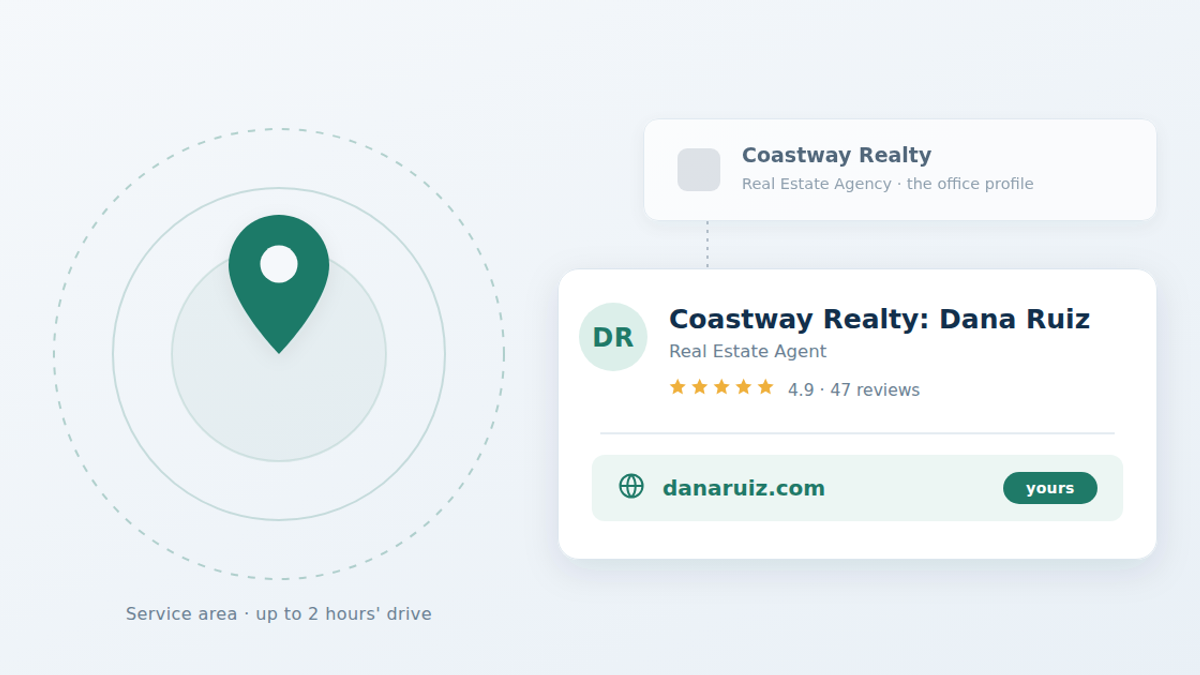
Yes. Google's guidelines name real estate agents as individual practitioners, the same group as doctors, lawyers and insurance agents, and a practitioner who deals with clients directly can have a Business Profile of their own, separate from the brokerage's. In an office with several agents, your profile carries your name alone, without the brokerage's; only a solo agent at a branded office uses the [brokerage]: [your name] format.
Three rules decide whether yours survives Google's moderation:
- Name it the way Google says for your office. One of several agents at the address: just your name, as you trade under it. The only agent at a branded location: one shared profile named
[brand]: [your name], Google's own example being "Allstate: Joe Miller." - Remove your address if you don't meet clients there. Work from home, and you set a service area instead: up to 20 areas, no more than about two hours' drive from your base.
- Claim and verify it in your own Google account, not the brokerage's. Whoever controls the profile keeps it when you change firms.
Everything below is from Google's published policy, checked again on November 12, 2026. The review rules changed in April 2026 in a way that matters for teams; that's near the end.
Google's policy on agents, in its own words
Google defines an individual practitioner as "a public-facing professional, typically with their own customer base," and names the qualifying professions directly: "Doctors, dentists, lawyers, financial planners, and insurance or real estate agents are all individual practitioners."
To qualify for a profile, you must meet two conditions: you operate in a public-facing role, and you can be contacted directly at the verified location during the hours you state. Google also says who doesn't qualify: support staff, and "sales associates or lead generation agents for corporations." So your assistant or your team's inside sales agent doesn't get a profile.
In practice, the test local-search specialists such as Sterling Sky apply is whether you function as your own business inside the brokerage: clients ask for you by name, your hours differ from the office's, you set your own prices, and a Google category fits what you do. For a licensed agent, all four are almost always true.
This matters because most agents assume the brokerage profile is the only one allowed, and quietly accept that every review they earn accrues to the brokerage's map listing instead of their own.
How should I name my Business Profile?
It depends on how many agents work from your address.
- One of several agents at the office (most agents): the brokerage keeps its own profile for the location, and yours is named for you only. Google's words: the practitioner's profile title "should include only the name of the practitioner, and shouldn't include the name of the organization." So "Dana Ruiz," not "Keller Williams Realty: Dana Ruiz."
- The only agent at a branded location: Google says it's best to share one profile with the brand, named
[brand/company]: [practitioner name], as in "Allstate: Joe Miller."
Either way, not "Dana Ruiz Homes" unless that is the name you actually trade under, and never "Dana Ruiz, #1 Waterfront Agent in Sarasota." Your brokerage's name still belongs on your website and your other advertising where your state's rules require it; what a real estate website has to show covers that.
Two things to avoid, because they are the most common reasons an agent profile gets suspended:
- Keyword stuffing the name. Your profile name must be the name you actually trade under. Appending your farm area or a superlative is a policy violation, and it is the single easiest thing for a competitor to report.
- Inventing a business name. If your license says one thing and your profile another, verification gets difficult.
What address do I use if I work from home?
If you do not serve clients at your address, Google's instruction is direct: "If you don't serve customers at your business address, remove your address from your Business Profile." You then operate as a service-area business.
The limits Google places on service areas are specific, and worth knowing before you pick:
- You can have up to 20 service areas.
- Your overall area "shouldn't be more than about 2 hours of driving time" from where the business is based.
- You must define areas by named places — cities, postal codes, regions. Google does not allow a radius.
- P.O. boxes and unstaffed virtual offices are not acceptable addresses.
If you do meet clients at the brokerage office and you are contactable there during your posted hours, you are a hybrid business: you can show the address and list service areas.
A practical note: 20 slots is more than most agents need. Local rankings are tied closely to proximity between the searcher and your verified point, so listing every town in the county does not make you competitive in all of them.
Who owns the profile if I change brokerages?
Whoever controls the profile decides what happens to it. If the brokerage created and verified it, the brokerage can request its removal when you leave. If you created and verified it under your own Google account, it moves with you — you update the name and address to your new firm and keep the reviews.
Those reviews are the asset. A profile with 40 reviews takes years to rebuild, and it is attached to whoever holds the login. Claim it yourself on day one, even if your broker offers to set it up.
It also runs the other way. Sterling Sky, a local-search agency, says that where a business has several practitioners, it can't get their listings removed or merged while the practitioner still works there. Agents are often told otherwise. What happens to the rest of your online presence when you move is in what happens to my website when I switch brokerages.
What website should my Business Profile link to?
The website field is the one part of a Business Profile most agents fill in wrong. The default move is to link to your brokerage bio page — the templated page at bigbrokerage.com/agents/your-name.
Two problems with that. First, the authority that link earns accrues to a domain you do not own, and disappears when you leave. Second, that page was not built to convert; it is a headshot, a phone number and a listing grid identical to 400 other agents' pages on the same site.
Link to a site on a domain you own instead. That is the whole argument for having one: a Business Profile drives people somewhere, and where it drives them should be yours. It does not need to be elaborate — your bio, your listings, your reviews, your service areas and a working contact form is enough, and we make the case elsewhere that an MLS feed usually isn't worth adding for a solo agent. If you're weighing what that site should cost, we priced every option an agent has.
Keep the name, address and phone number on your site identical to what is on the profile. Inconsistency between the two is a routine cause of weak local rankings. Our free site check shows whether your site can be read by search engines and AI tools at all; it doesn't look at your Business Profile.
The same goes for the other places people look you up. Licensed agents in nine states have a page on our license check, built from the state's license file. A free listing on the Swift Agent Network puts the member mark and a link to your website on that page, so it points to the same site your Business Profile does. Full membership ($500 a year) adds your photo, phone, bio and a contact form, and our $890-a-year Agent Website includes it. None of that is a ranking or a promise of calls; it puts the same correct details where people check.
What changed about Google reviews in April 2026?
On April 17, 2026, Google added two clauses to the Rating Manipulation section of its Maps content policy. Both now explicitly prohibit:
- "merchants requesting that staff solicit a certain number of reviews"
- "merchants requesting that staff solicit reviews that include specific content, including content that identifies a staff member"
Read that carefully, because it is narrower than some coverage suggests. It targets a business directing its staff — so a broker setting a review quota for agents, or instructing agents to ask clients to name them in a review, is now squarely offside. A solo agent asking a happy client for an honest review is not.
The longer-standing rules still do most of the work, and agents break them constantly. Google prohibits offering "payment, discounts, free goods and/or services — in exchange for posting any review." It separately prohibits businesses that "discourage or prohibit negative reviews, or selectively solicit positive reviews from customers" — which makes the popular tactic of screening clients first, and only sending the review link to the ones who rate you highly, a violation.
What is permitted is plain: you may "solicit or encourage the posting of content that does represent a genuine experience, without offering incentives to do so or attempting to influence the rating or the contents of the review." Ask everyone, ask the same way, don't script it, don't pay for it. Once you have reviews, whether you can show your Zillow ones on your own site is a separate question, answered in can I put my Zillow reviews on my own website.
A complete agent profile, item by item
Working order, once it is verified:
- Category. Primary category "Real Estate Agent," not "Real Estate Agency," which is the brokerage's. Google's category list changes, so pick from what its editor offers you that day.
- Hours. The hours you will actually answer the phone at that location, since that is the eligibility condition.
- Service areas. Where you genuinely work, inside the two-hour rule.
- Website. Your own domain.
- Photos. Your headshot, and photos of properties and neighborhoods you have actually worked.
- Services and description. Buyer representation, listing, relocation, whatever applies — in plain language.
- Reviews. Ask every closed client, the same way, without a script.
- Posts. Periodic updates — a new listing, a market note, an open house.
Insurance agents get the same treatment, and Google's policy names them in the same sentence as real estate agents. If you're an independent insurance producer working under an agency's brand, the [agency]: [your name] format and the ownership rules apply to you identically. What the website behind that profile costs is compared in Best insurance agent websites in 2026.
Local search is only one channel. It is worth reading it alongside where agents' clients actually come from, and, since a growing share of people now ask an AI assistant instead of searching, what AEO means for agents.
FAQ
Do I need my broker's permission to make a Google Business Profile?
Google doesn't ask for it: its guidelines let any public-facing practitioner who can be reached at the verified location during posted hours have a profile. Your brokerage's own advertising policy and your state's advertising rules still apply to what you put on it and on the site it links to, so tell your broker, and keep the brokerage name on your website where your state requires it.
Can a real estate agent have a Google Business Profile without an office?
Yes. If you don't meet clients at your address, Google tells you to remove it and run the profile as a service-area business. You can list up to 20 service areas, named by city or postal code rather than a radius, within about two hours' drive of your base. P.O. boxes and unstaffed virtual offices aren't accepted as addresses.
Can I have a Google Business Profile if my brokerage already has one?
Yes. In an office with several public-facing agents, the brokerage keeps a profile for the location and each agent can have their own, named for the agent only. Sterling Sky reports that a business can't get a practitioner's listing removed or merged while that practitioner still works there.
Can I have more than one profile for the different towns I cover?
No. Google says a practitioner shouldn't have multiple profiles to cover all of their specializations, and towns are handled by service areas on one profile. A second profile is only for a second real location where you actually meet clients during posted hours.
Can I offer clients a gift card for leaving a Google review?
No. Google prohibits offering "payment, discounts, free goods and/or services" in exchange for a review. It also prohibits selectively soliciting positive reviews or screening clients before sending the review link. You may ask for honest reviews, as long as you ask everyone the same way.
What should I name my Google Business Profile as an agent?
Your own name, as you trade under it, if other agents also work from your office. If you are the only agent at a branded location, Google prefers one shared profile named [brand]: [your name], as in its example "Allstate: Joe Miller." Never add your farm area, a slogan or a superlative to the name; that is a policy violation and a common cause of suspension.
What happens to my Google reviews if I switch brokerages?
They stay with the profile, and the profile stays with whoever controls the account. If you verified it yourself, you update the details for your new firm and keep the reviews. If the brokerage verified it, they can request its removal. Claim it in your own account from the start.
Should my Business Profile link to my brokerage bio page?
Better to link to a site on a domain you own. A brokerage bio page builds authority for a domain you will lose when you leave, and it is templated identically to every other agent at the firm. Keep your name, address and phone consistent between your site and your profile. More in do I need my own website if my brokerage gives me one.
More on Google Business Profiles
- How do I verify my Google Business Profile as an agent?
- Why was my real estate Google Business Profile suspended?
Policy details first checked September 17, 2026, and checked again November 12, 2026 against Google's published guidelines. Google Business Profile policies change frequently — check the current guidelines before acting on anything here.
Sources: Google — Guidelines for representing your business on Google · Google — Manage your service areas · Google — Prohibited & restricted content · PPC Land — Google tightens Maps review policy (April 17, 2026) · Launchcodex — GBP review policy update, April 2026 · Sterling Sky — Guide to practitioner listings
← All insights